
Download RetroStudio – Roblox, Roblox simulator, 2009 Roblox, 2010 Roblox, 2015 Roblox, game creation, Roblox Studio, retro gaming, old Roblox interface, create games, game development, 2007 studio, 2016 Roblox, 2018 Roblox, 2004 Experience, Roblox nostalgia, free Roblox game, free game
Overview
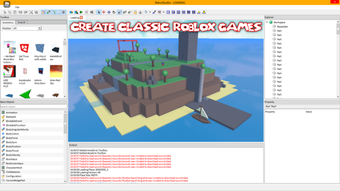
RetroStudio is a free-to-use Roblox game simulator developed by Retro Dev, designed for players who cherish the early days of Roblox. The game offers a nostalgic journey through the platform’s history, allowing users to experience and recreate the look and feel of Roblox from 2009 to 2015. As a fan-made project, it mirrors the aesthetic and interface of older Roblox Studio versions, appealing to veteran players seeking a sense of familiarity.
The core experience revolves around game creation with retro-inspired mechanics and visual design, making it ideal for those interested in the roots of Roblox’s development culture. While the publisher has not shared detailed story information, the focus remains firmly on simulation and creative exploration. The game falls under the simulator genre, emphasizing authenticity and stylistic replication over complex narratives or competitive gameplay.
RetroStudio does not support multiplayer features, which aligns with its single-player, creative-focused intent. It is available on PC and can be downloaded directly from the official website. The game is particularly suited for fans of retro gaming, Roblox nostalgia, and old-school game development tools.
Gameplay & Core Mechanics
RetroStudio provides a gameplay structure centered on simulation and creative expression, allowing players to design games based on specific Roblox eras between 2009 and 2015. The core mechanic involves selecting a target year, which then influences the visual style, interface layout, and gameplay elements of the created game. Players can use the simulator to build and publish games that emulate the design language and technical constraints of the chosen period.
Interaction is primarily menu-driven, with tools and assets tailored to reflect the era selected. The developer did not provide additional gameplay details, but the experience is expected to mirror the workflow of early Roblox Studio, including basic object placement, scripting, and scene setup. Avatar customization is supported, enabling users to craft unique virtual appearances.
The game also allows players to explore content created by others through usernames or user IDs, fostering a community-driven discovery experience. While no official information was shared about advanced mechanics or game modes, the focus remains on replication, creation, and exploration. The absence of multiplayer functionality suggests the experience is designed for solitary development and viewing.
Overall, the gameplay is structured around nostalgia-driven creation, offering a safe, non-competitive environment for creative experimentation.
Key Features
- Choose a year between 2009 and 2015 to define the game’s aesthetic and mechanics.
- Recreate the look and feel of early Roblox Studio interfaces.
- Design and publish games with retro-themed visuals and gameplay elements.
- Customize avatars with unique virtual appearances.
- Explore user-created content by searching usernames or user IDs.
- Free-to-use simulator with no payment required.
Graphics, Audio & Performance
RetroStudio features a visual style that replicates the look of Roblox from the 2009–2015 era, with pixelated textures, simplified UI elements, and low-poly models characteristic of early game development. Animations are basic and functional, aligning with the technical limitations of the time period being simulated. The atmosphere is intentionally retro, emphasizing authenticity over modern polish.
Sound design and music are minimal, with generic interface sounds and ambient cues that match the era’s audio standards. No official performance benchmarks were provided, and detailed graphical settings were not disclosed. The developer did not list minimum system requirements, so users should rely on general PC compatibility.
Platform-specific enhancements were not disclosed, and there is no information on frame rate consistency or loading times. Given the simulator nature of the game, performance is expected to be stable on modern systems, but actual results may vary. The focus remains on interface fidelity and nostalgic immersion rather than high-end visual fidelity.
Overall, the audio and visual presentation successfully serve the game’s core purpose: to recreate a bygone era of Roblox development.
Platform Compatibility & Requirements
RetroStudio is available exclusively on PC, with no information provided about other platforms. The game is free to download and use, with no payment required for access to its features. The release version was launched on July 10, 2024.
The developer did not list minimum system requirements, and compatibility details were not fully provided. Users are advised to ensure their PC meets general standards for running similar applications. The operating system is not specified beyond “PC.” No information was shared about online updates, cloud saves, or installation size.
Players should download the game directly from the official website to ensure authenticity and security. The game does not require an internet connection for basic gameplay, though access to user-created content may depend on connectivity.
Pros and Cons
Pros
- Free-to-use simulator with no cost to access features.
- Authentic recreation of Roblox interfaces from 2009 to 2015.
- Supports game creation based on specific historical Roblox eras.
- Allows avatar customization for unique virtual identities.
- Community-driven content discovery via usernames or user IDs.
- Perfect for fans of Roblox nostalgia and retro gaming.
Cons
- No multiplayer functionality available.
- Developer did not provide system requirements or performance benchmarks.
- Interface and mechanics are limited to simulation, with no advanced tools.
- No information on update frequency or future development plans.
- Platform availability restricted to PC only.
FAQ Section
Is the game safe to download?
Yes, RetroStudio can be downloaded directly from the official website. It is recommended to use the official source to ensure the file is secure and free from third-party modifications.
Is it beginner-friendly?
Yes, the game is designed with a straightforward interface that mirrors early Roblox Studio, making it accessible for users familiar with retro game development tools. No prior experience is required, though basic computer literacy is helpful.
Does it receive updates?
The developer has not shared information about update frequency or future content plans. Players should monitor the official website for announcements.
What platforms support it?
RetroStudio is currently available only on PC. No information was provided about mobile, console, or web versions.
Does the game require an internet connection?
Basic gameplay does not require an internet connection. However, accessing user-created content or browsing the community gallery may require online connectivity.
Final Thoughts
RetroStudio delivers a focused, nostalgic experience for players who miss the early days of Roblox. By simulating the interface and creative tools of the 2009–2015 era, it provides a unique space for fans to recreate, explore, and appreciate the roots of Roblox’s development culture. While it lacks multiplayer features and advanced tools, its strengths lie in authenticity, accessibility, and free access.
The game is ideal for retro gaming enthusiasts, Roblox veterans, and anyone interested in the history of online game creation. It fills a niche within the simulator genre by prioritizing emotional resonance over technical innovation. For those seeking a safe, free, and creatively fulfilling way to revisit the past, RetroStudio stands out as a compelling choice.
Download RetroStudio now.







